Water bodies detection workflow v2.0.0
Water bodies detection based on NDWI and Otsu threshold applied to Sentinel-2 COG STAC items
This software is licensed under the terms of the MIT License license - SPDX short identifier: MIT
2026-03-19 - 2026-10-11T12:41:02.684 Copyright EOAP -
Project Team
Authors
| Name | Organization | Role | Identifier | |
|---|---|---|---|---|
| Brito, Fabrice | info@terradue.com | Terradue |
Contributors
The are no contributors for this project.
Zarr Cloud-Native Format documentation
Zarr Cloud-Native Format documentation can be found on https://eoap.github.io/zarr-cloud-native-format/.
Runtime environment
Supported Operating Systems
Requirements
Software Source code
- Browsable version of the source repository;
- Continuous integration system used by the project;
- Issues, bugs, and feature requests should be submitted to the following issue management system for this project
water-bodies
CWL Class
Requirements
Inputs
| Id | Type | Label | Doc |
|---|---|---|---|
stac_api_endpoint |
Any | STAC API endpoint | STAC API endpoint |
collection |
string | STAC collection | STAC collection identifier |
aoi |
Polygon: | Area of interest | Area of interest polygon with bbox [minx, miny, maxx, maxy] |
start-datetime |
One of: | Start time | Start time |
end-datetime |
One of: | End time | End time |
limit |
int | limit | limit |
max-items |
int | max-items | max-items |
filter-lang |
One of: | Filter language | Filter language |
filter |
One of: | Filter | Filter |
bands |
array of string |
bands used for the NDWI | bands used for the NDWI |
overview_levels |
int | Number of Zarr overview levels | Number of multiscale overview levels generated by stac-zarr |
continuous_overview_reducer |
enum:
|
Overview reducer for continuous variables | Reducer used for continuous variables when generating overviews (mean, max, median, nearest) |
categorical_overview_reducer |
enum:
|
Overview reducer for categorical variables | Reducer used for categorical variables when generating overviews (mean, max, median, nearest) |
stac_object_type |
enum:
|
STAC object type | Output STAC object type emitted by stac-zarr (collection or item) |
Steps
| Id | Runs | Label | Doc |
|---|---|---|---|
| build_api_endpoint | #build_api_endpoint |
Build STAC API endpoint | Normalize endpoint to APIEndpoint schema expected by discovery step |
| build_search_request | #build_search_request |
Build STAC search request | Build STACSearchSettings from AOI and query inputs |
| discovery | #stac-client |
STAC API discovery | Discover STAC items from a STAC API endpoint based on a search request |
| convert_search | #convert-search |
Convert Search | Convert Search results to get the item self hrefs and the area of interest |
| water_bodies | #detect_water_body |
Water bodies detection | Water bodies detection based on NDWI and otsu threshold applied to each STAC item (sub-workflow) |
| stac-collection | #stac-collection |
Create a STAC catalog with COG outputs | Create a STAC catalog with the detected water bodies COG outputs |
| stac_zarr | #stac-zarr |
Create a STAC Catalog for the Zarr store | Create a STAC Catalog for the Zarr store from the STAC catalog with COG outputs |
| stac_eopf_product | #stac-eopf-product |
Create a EOPF Zarr store from a STAC catalog | Create a EOPF Zarr store from a STAC catalog with COG products |
Outputs
| Id | Type | Label | Doc |
|---|---|---|---|
zarr_stac_catalog |
Directory | Zarr STAC catalog | STAC catalog produced by the stac-zarr step |
stac_catalog |
Directory | Intermediate STAC catalog | STAC catalog produced by the stac-collection step |
eopf_product_stac_catalog |
Directory | EOPF product STAC catalog | STAC catalog produced by the stac-eopf-product step |
OGC API - Processes
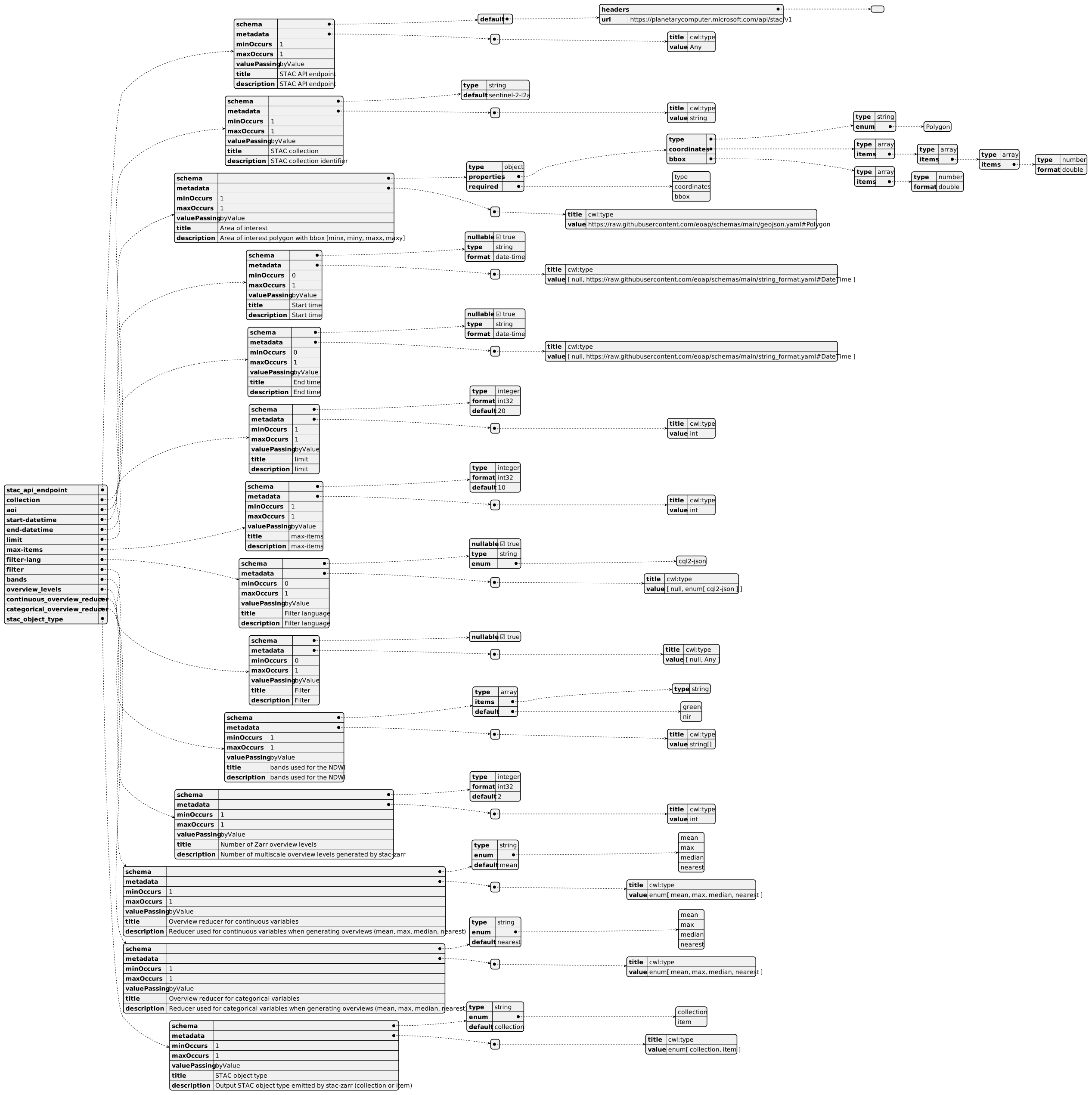
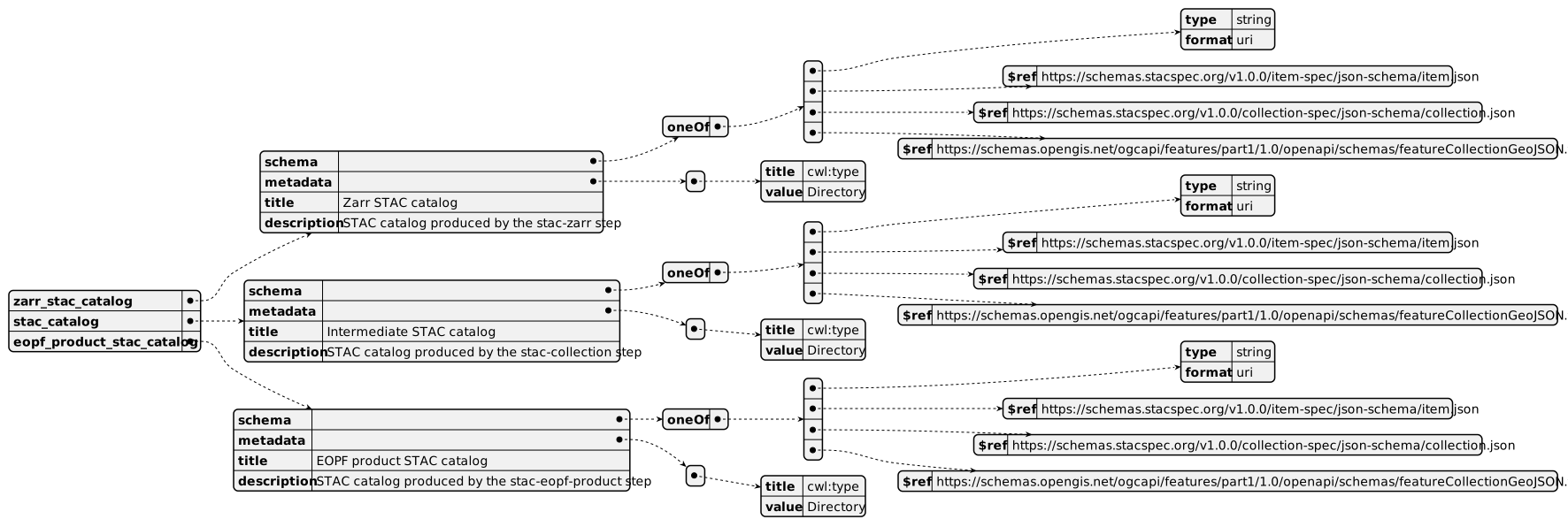
When water-bodies Workflow is exposed through OGC API - Processes - Part 1: Core, inputs and outputs fields below represent the interface of the getProcessDescription API.
Inputs
Outputs
UML Diagrams
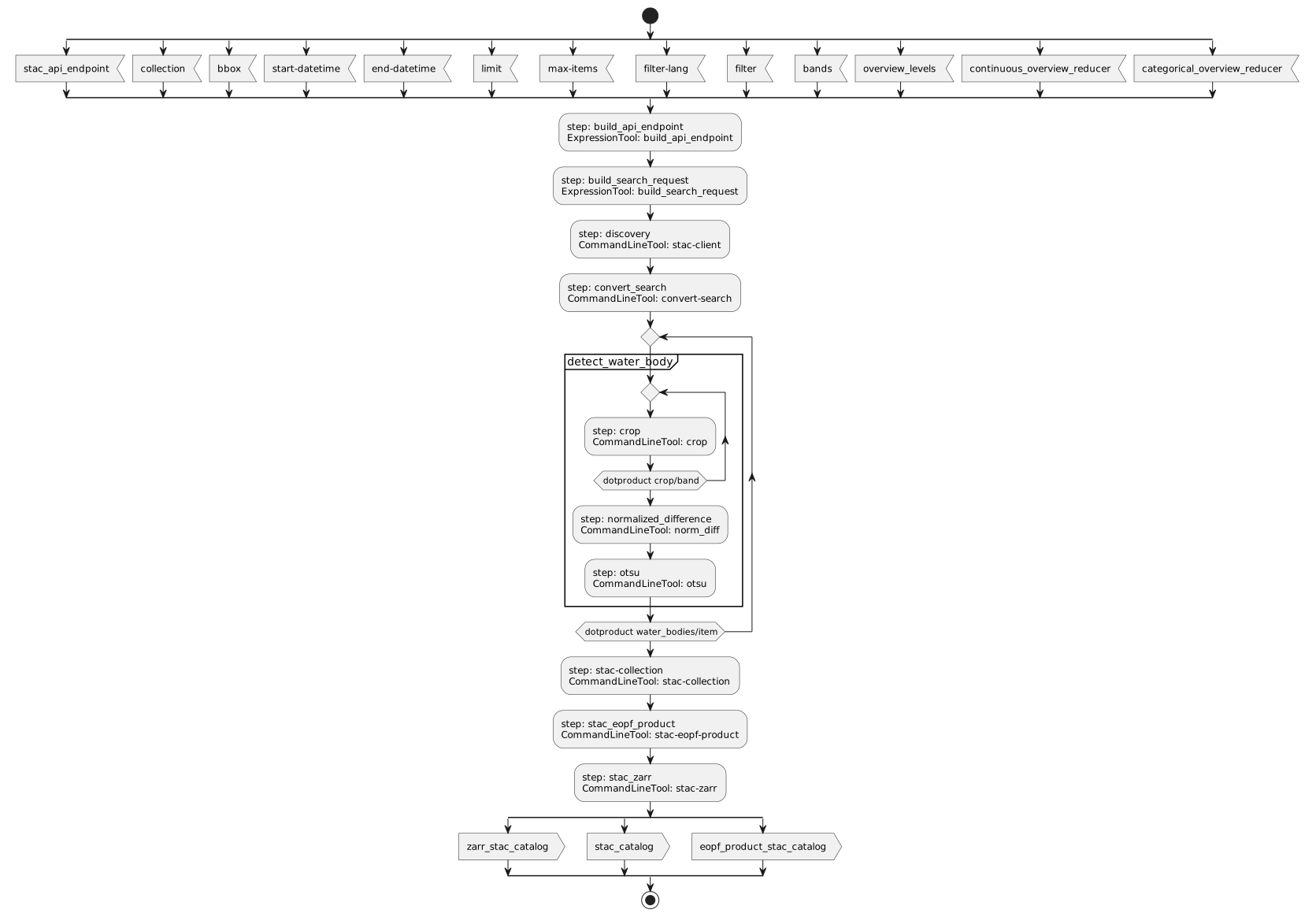
Activity diagram
Learn more about the Activity diagram below.
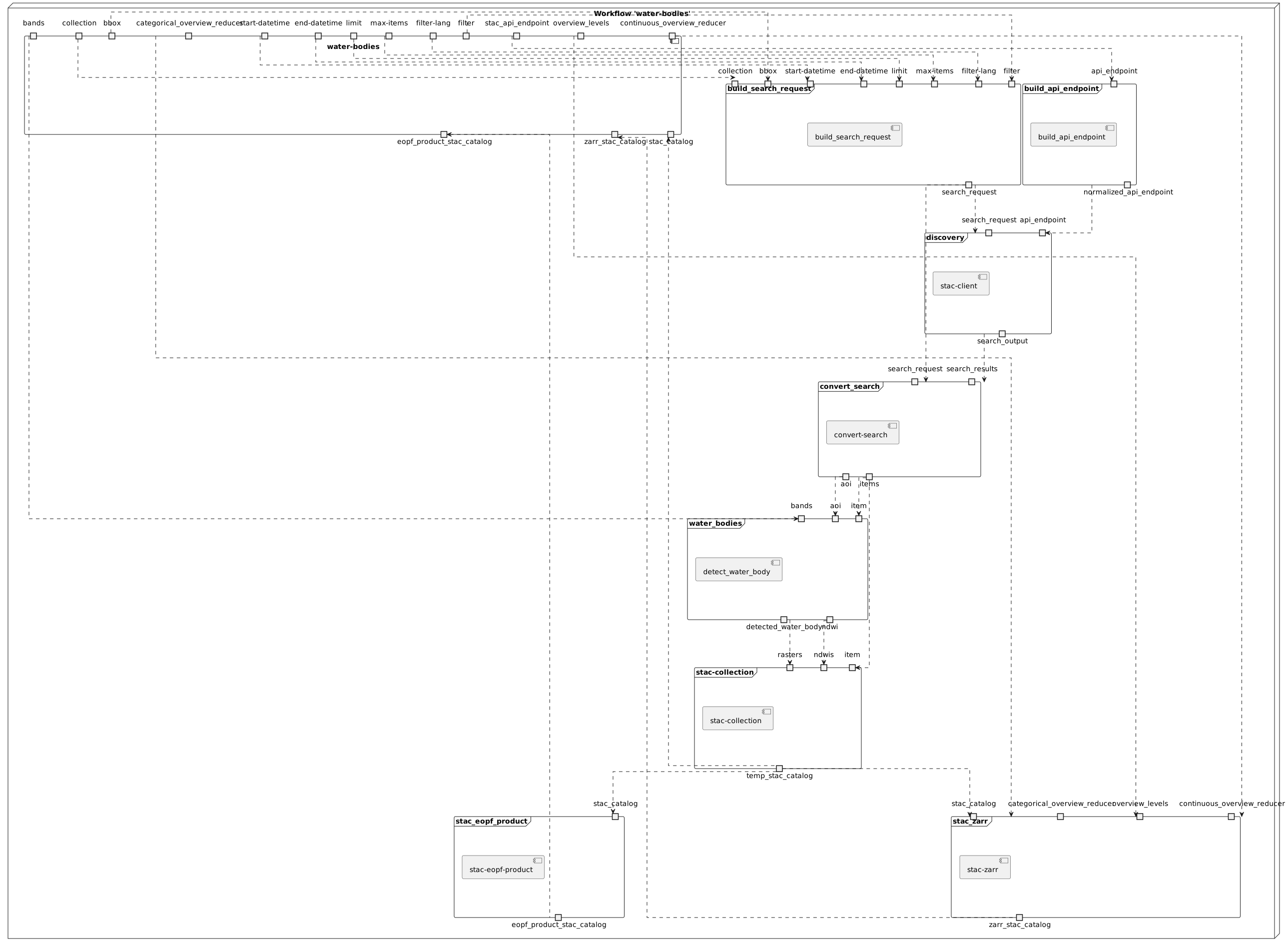
Component diagram
Learn more about the Component diagram below.
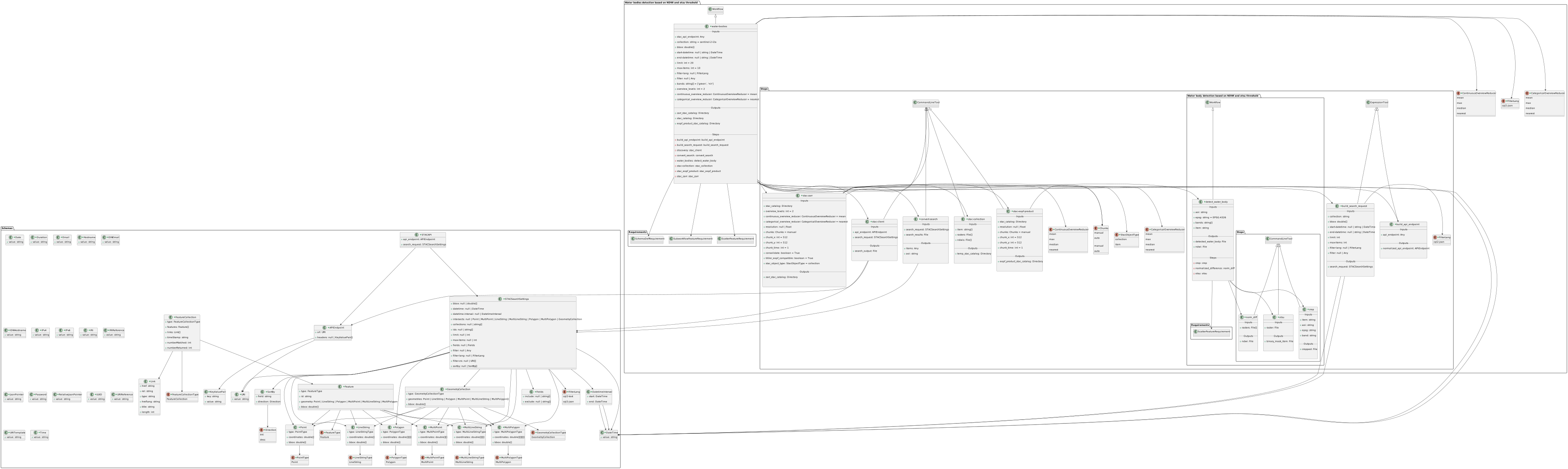
Class diagram
Learn more about the Class diagram below.
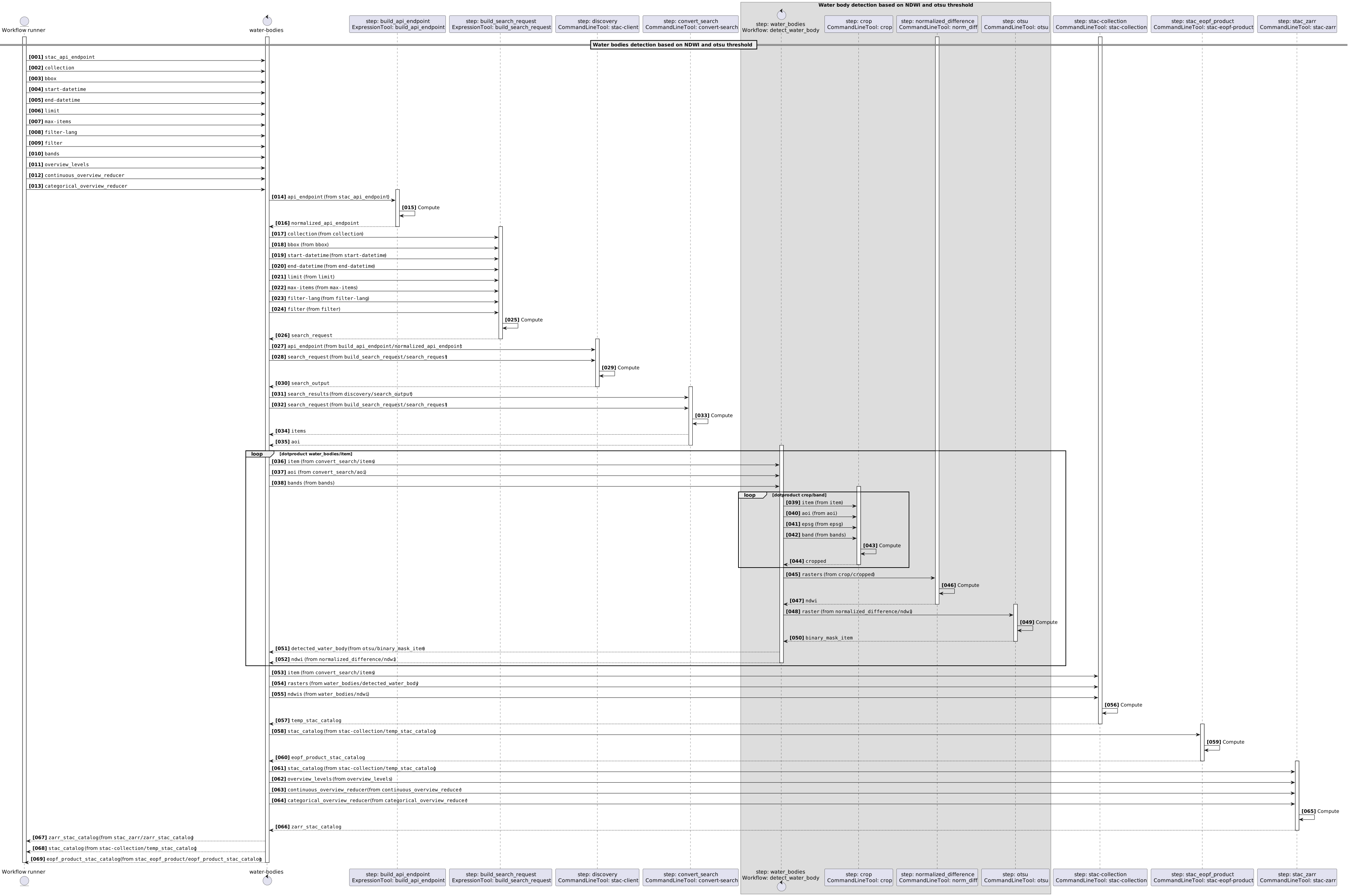
Sequence diagram
Learn more about the Sequence diagram below.
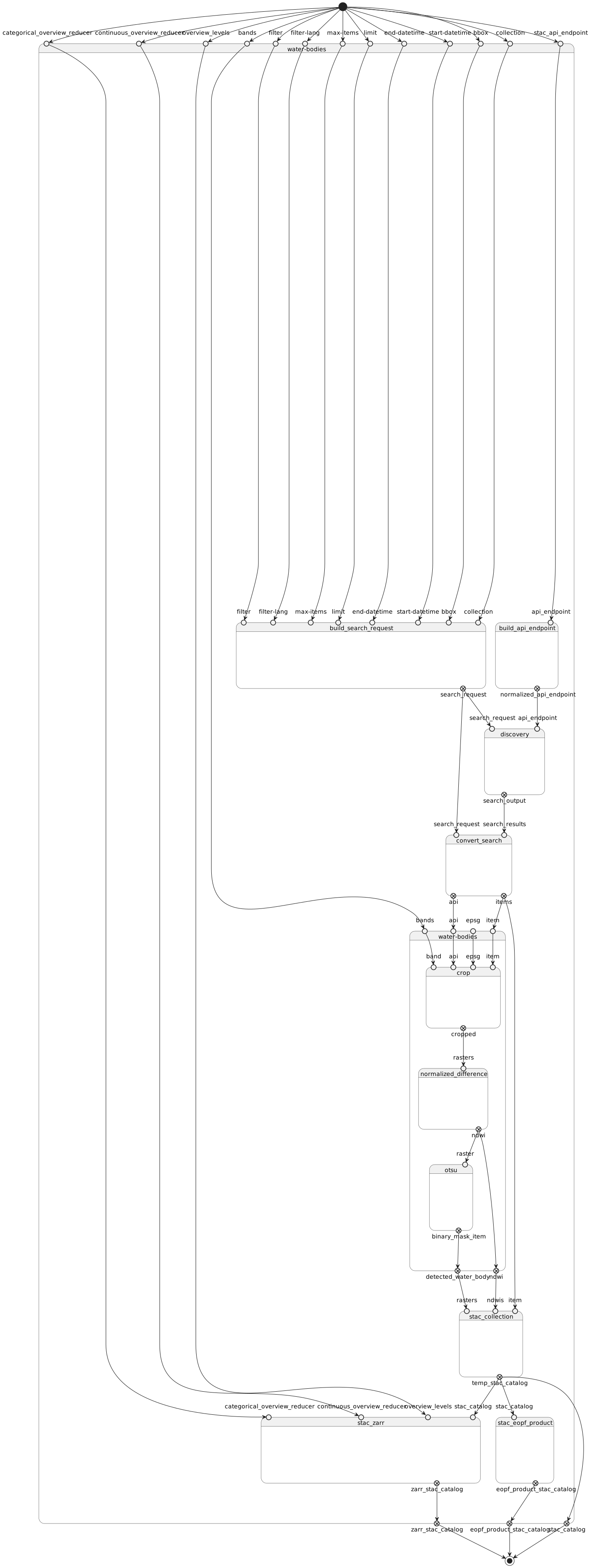
State diagram
Learn more about the State diagram below.
Run in step
build_api_endpoint
build_api_endpoint
CWL Class
Inputs
| Id | Option | Type |
|---|---|---|
api_endpoint |
--api_endpoint |
Any |
Run in step
build_search_request
build_search_request
CWL Class
Inputs
| Id | Option | Type |
|---|---|---|
collection |
--collection |
string |
aoi |
--aoi |
Polygon: |
start-datetime |
--start-datetime |
One of: |
end-datetime |
--end-datetime |
One of: |
limit |
--limit |
int |
max-items |
--max-items |
int |
filter-lang |
--filter-lang |
One of: |
filter |
--filter |
One of: |
Run in step
discovery
stac-client
CWL Class
Inputs
| Id | Option | Type |
|---|---|---|
api_endpoint |
--api_endpoint |
APIEndpoint: |
search_request |
--search_request |
STACSearchSettings:
|
Execution usage example:
stac-client search $(inputs.api_endpoint.url.value) ${ var collections = inputs.search_request.collections; return ['--collections', collections.join(",")]; } ${ var bbox = inputs.search_request.bbox; return Array.isArray(bbox) && bbox.length >= 4 ? ['--bbox'].concat(bbox.map(String)) : []; } ${ var limit = inputs.search_request.limit; return ['--limit', String(limit == null ? 10 : limit)]; } ${ var maxItems = inputs.search_request['max-items']; return ['--max-items', String(maxItems == null ? 20 : maxItems)]; } ${ var args = []; var filter = inputs.search_request.filter; var filterLang = inputs.search_request['filter-lang']; if (filterLang) { args.push('--filter-lang', filterLang); } if (filter) { args.push('--filter', JSON.stringify(filter)); } return args; } ${ var datetime = inputs.search_request.datetime; var interval = inputs.search_request.datetime_interval; if (datetime) { return ['--datetime', datetime]; } if (interval) { var start = interval.start && interval.start.value || '..'; var end = interval.end && interval.end.value || '..'; return ['--datetime', start + '/' + end]; } return []; } ${ var ids = inputs.search_request.ids; return Array.isArray(ids) && ids.length > 0 ? ['--ids'].concat(ids.map(String)) : []; } ${ var intersects = inputs.search_request.intersects; return intersects ? ['--intersects', JSON.stringify(intersects)] : []; } --save discovery-output.json \
--api_endpoint <API_ENDPOINT> \
--search_request <SEARCH_REQUEST>
Run in step
convert_search
convert-search
CWL Class
Inputs
| Id | Option | Type |
|---|---|---|
search_request |
--search_request |
STACSearchSettings:
|
search_results |
--search_results |
File |
Execution usage example:
/bin/sh run.sh \
--search_request <SEARCH_REQUEST> \
--search_results <SEARCH_RESULTS>
Run in step
water_bodies
detect_water_body
CWL Class
Requirements
Inputs
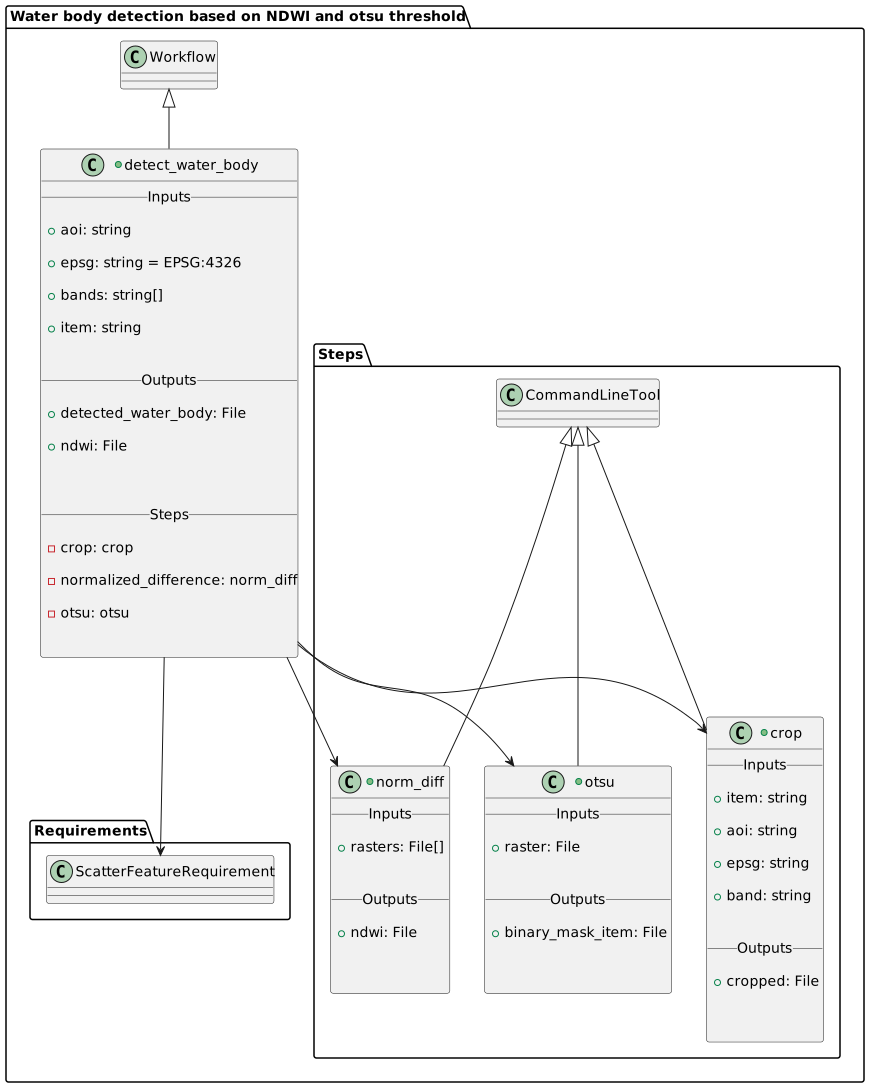
| Id | Type | Label | Doc |
|---|---|---|---|
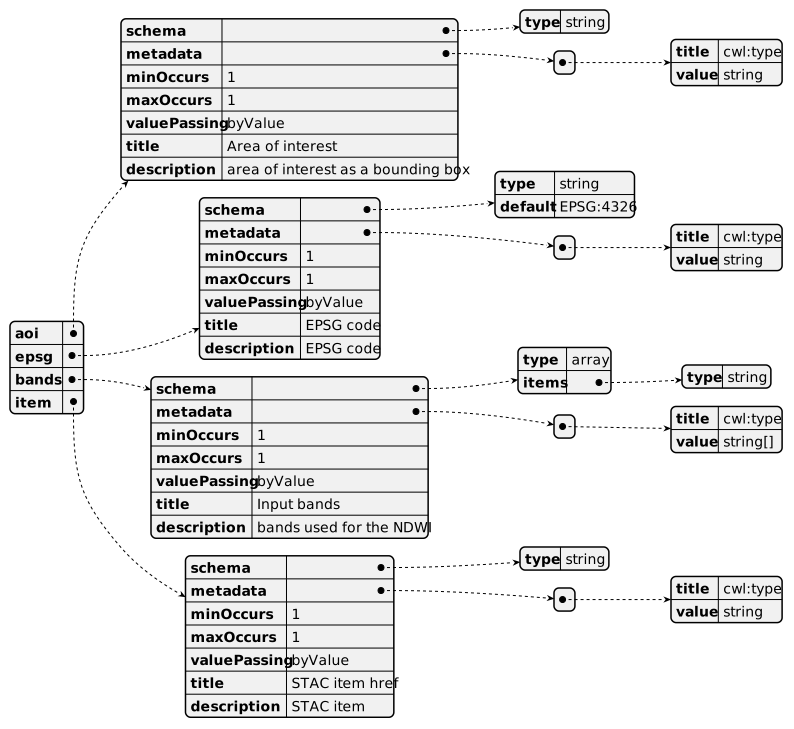
aoi |
string | Area of interest | area of interest as a bounding box |
epsg |
string | EPSG code | EPSG code |
bands |
array of string |
Input bands | bands used for the NDWI |
item |
string | STAC item href | STAC item |
Steps
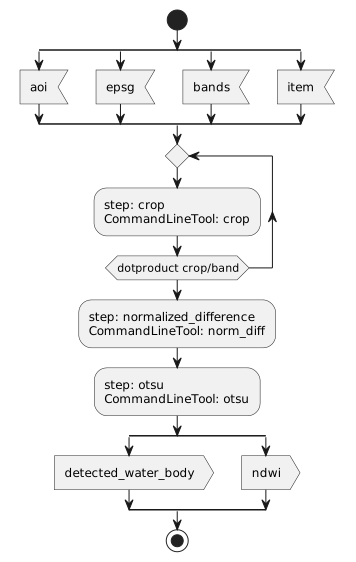
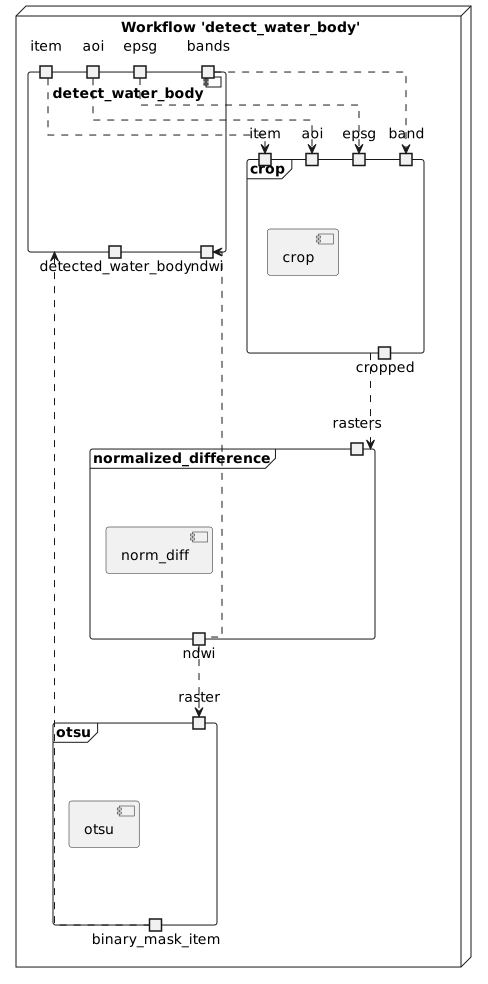
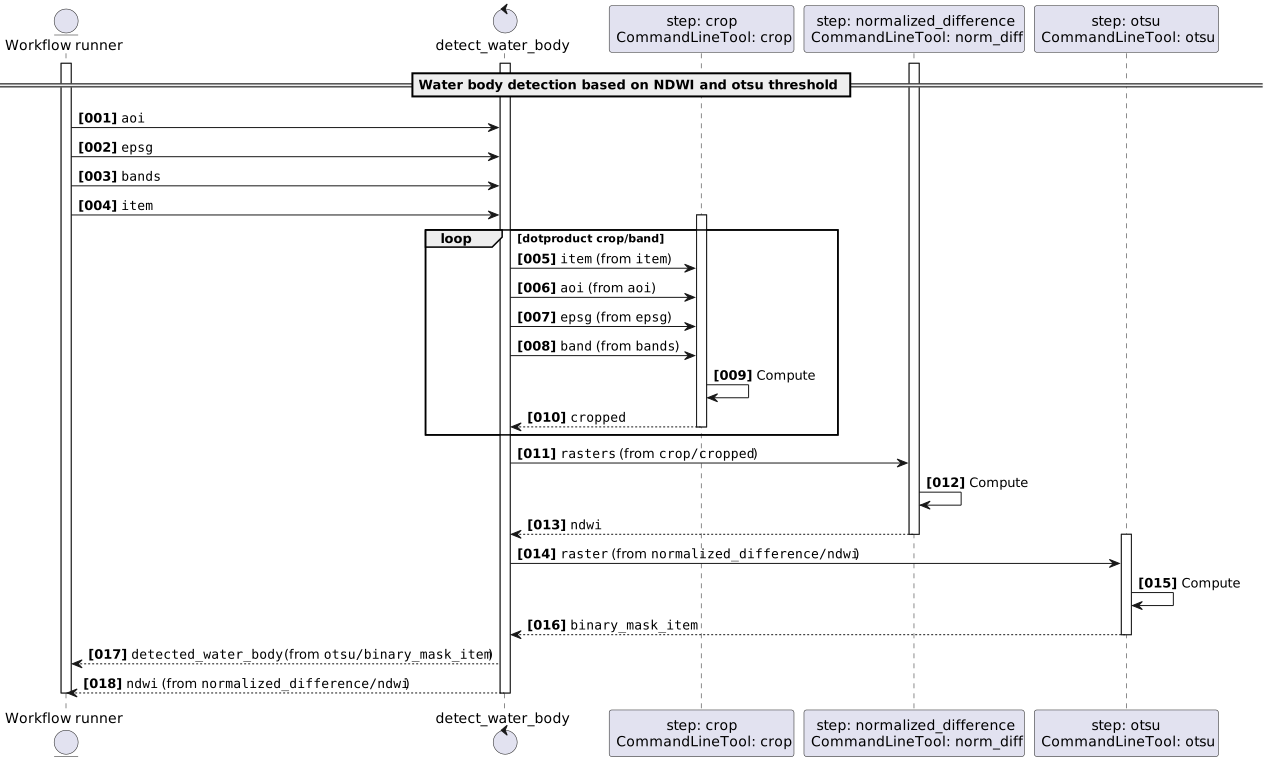
| Id | Runs | Label | Doc |
|---|---|---|---|
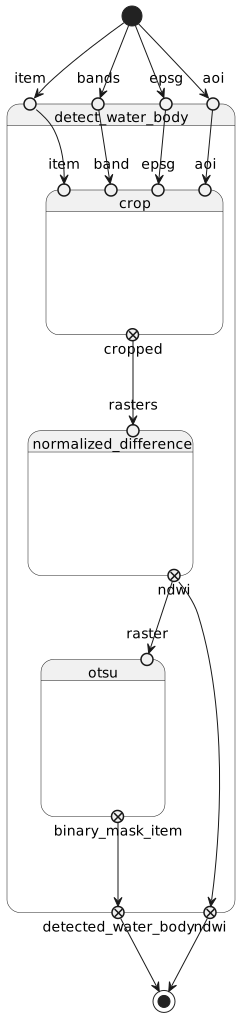
| crop | #crop |
Crop spectral bands | Crop and reproject each requested band to the area of interest. |
| normalized_difference | #norm_diff |
Compute NDWI | Compute the normalized difference water index from the cropped bands. |
| otsu | #otsu |
Detect water bodies | Apply Otsu thresholding to the NDWI raster to produce a binary water mask. |
Outputs
| Id | Type | Label | Doc |
|---|---|---|---|
detected_water_body |
File | Water body mask | Binary water mask generated by the Otsu step |
ndwi |
File | NDWI raster | NDWI raster generated by normalized difference step |
OGC API - Processes
When detect_water_body Workflow is exposed through OGC API - Processes - Part 1: Core, inputs and outputs fields below represent the interface of the getProcessDescription API.
Inputs
Outputs

UML Diagrams
Activity diagram
Learn more about the Activity diagram below.
Component diagram
Learn more about the Component diagram below.
Class diagram
Learn more about the Class diagram below.
Sequence diagram
Learn more about the Sequence diagram below.
State diagram
Learn more about the State diagram below.
Run in step
crop
crop
CWL Class
Inputs
| Id | Option | Type |
|---|---|---|
item |
--input-item |
string |
aoi |
--aoi |
string |
epsg |
--epsg |
string |
band |
--band |
string |
asset_signing |
--asset-signing |
enum:
|
Execution usage example:
crop \
--input-item <ITEM> \
--aoi <AOI> \
--epsg <EPSG> \
--band <BAND> \
--asset-signing <ASSET_SIGNING>
Run in step
normalized_difference
norm_diff
CWL Class
Inputs
| Id | Option | Type |
|---|---|---|
rasters |
--rasters |
array of File |
Execution usage example:
norm-diff \
--rasters <RASTERS>
Run in step
otsu
otsu
CWL Class
Inputs
| Id | Option | Type |
|---|---|---|
raster |
--raster |
File |
Execution usage example:
otsu \
--raster <RASTER>
Run in step
stac-collection
stac-collection
CWL Class
Inputs
| Id | Option | Type |
|---|---|---|
item |
--item |
array of string |
rasters |
--rasters |
array of File |
ndwis |
--ndwis |
array of File |
Execution usage example:
stac-collection \
--item <ITEM> \
--rasters <RASTERS> \
--ndwis <NDWIS>
Run in step
stac_zarr
stac-zarr
CWL Class
Inputs
| Id | Option | Type |
|---|---|---|
stac_catalog |
--stac-catalog |
Directory |
overview_levels |
--overview-levels |
int |
continuous_overview_reducer |
--continuous-overview-reducer |
enum:
|
categorical_overview_reducer |
--categorical-overview-reducer |
enum:
|
resolution |
--resolution |
One of: |
chunks |
--chunks |
enum:
|
chunk_x |
--chunk-x |
int |
chunk_y |
--chunk-y |
int |
chunk_time |
--chunk-time |
int |
consolidate |
--consolidate |
boolean |
titiler_eopf_compatible |
--titiler-eopf-compatible |
boolean |
stac_object_type |
--stac-object-type |
enum:
|
Execution usage example:
stac-zarr \
--stac-catalog <STAC_CATALOG> \
--overview-levels <OVERVIEW_LEVELS> \
--continuous-overview-reducer <CONTINUOUS_OVERVIEW_REDUCER> \
--categorical-overview-reducer <CATEGORICAL_OVERVIEW_REDUCER> \
--chunks <CHUNKS> \
--chunk-x <CHUNK_X> \
--chunk-y <CHUNK_Y> \
--chunk-time <CHUNK_TIME> \
--consolidate \
--stac-object-type <STAC_OBJECT_TYPE>
Run in step
stac_eopf_product
stac-eopf-product
CWL Class
Inputs
| Id | Option | Type |
|---|---|---|
stac_catalog |
--stac-catalog |
Directory |
resolution |
--resolution |
One of: |
chunks |
--chunks |
enum:
|
chunk_x |
--chunk-x |
int |
chunk_y |
--chunk-y |
int |
chunk_time |
--chunk-time |
int |
Execution usage example:
stac-eopf-product \
--stac-catalog <STAC_CATALOG> \
--chunks <CHUNKS> \
--chunk-x <CHUNK_X> \
--chunk-y <CHUNK_Y> \
--chunk-time <CHUNK_TIME>
Execution and validation notes
The package uses CWL v1.2. Docker declarations are execution requirements.
Build local images with task containers:build:producer. Select #water-bodies
when validating or running the package, because it also contains a subworkflow.
CLI examples use placeholders for values. Optional resolution can be set with
--resolution <RESOLUTION>. --consolidate is a flag; use --no-consolidate
to disable consolidation. The deprecated --titiler-eopf-compatible flag takes
no value and does not suppress GeoZarr metadata.
stac-zarr writes the published Pilot v0.1 proj, spatial, and multiscales
conventions. It validates the completed store with the GeoZarr Toolkit Python API
before writing STAC output and consolidating metadata. Each measurement and
overview array declares its own projection and spatial metadata. Invalid stores
raise an error; partial files can remain on disk after failure.
Validate existing stores with stac-zarr-validate /absolute/path/to/output.zarr.
See GeoZarr compliance for the
validation scope and CLI usage for runnable examples.